
# Widget
Feature Background
Widgets are partial Mini-Programs that can be embedded into native pages of the Host-App. They help Host-App developers provide a better user experience based on actual functionalities and scenarios.
# 1. Feature Introduction
A Widget is a card-style Mini-Program application that can directly embed partial Mini-Program content into native pages of the Host-App, rendering the Mini-Program view directly within the Host-App's pages.
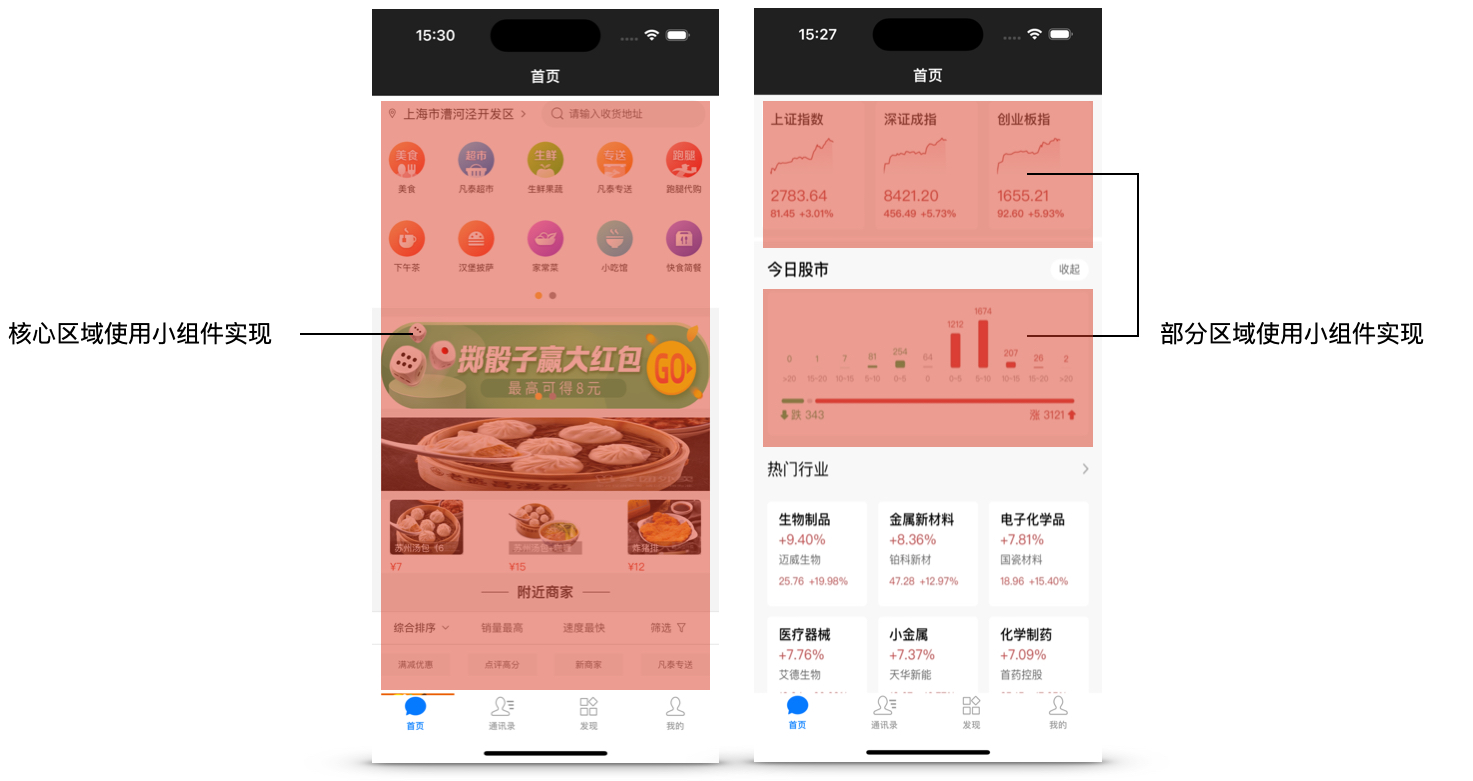
The code syntax of Widgets is completely consistent with Mini-Programs. While removing elements such as the Navigation Bar and Capsule Button, and disabling routing events, Widgets also provide the same set of components and APIs available in Mini-Programs for developers to use during development.
# 2. Operation Instructions
Using the Mini-Program Management Console, when creating a new Mini-Program, select the type as "Widget". After creating a Mini-Program of the "Widget" type, you can write and debug its code using FinClip Studio.
# 3. Feature and Environment Comparison
The current feature may have differences and limitations across different environments. Please refer to the table below for specifics. For further details on the differences and introductions between versions, click here (opens new window).
| Community Edition Environment | SaaS Environment | Enterprise Edition (Annual Payment or One-time Purchase) | |
|---|---|---|---|
| Widget | ❌ | ✅ | Available upon request |
