Mini-App Container vs Cross-Platform Solutions
A Developer's Guide to Building Cross-Platform Apps with Security
Published on FinClip Tech Blog | Target: Mobile Developers
Table of Contents
· 1. Introduction: The Cross-Platform Dilemma
· 2. What is a Mini-App Container?
· 3. The Technical Core: Dual-Thread Architecture
· 4. Cross-Platform Comparison
· 5. Security: The Sandbox Advantage
· 6. Real-World Use Cases
· 7. Conclusion: When to Choose Mini-App Container
1. Introduction: The Cross-Platform Dilemma
Every mobile developer faces the same dilemma: how to build once and deploy everywhere without sacrificing user experience. The landscape is crowded with options—React Native, Flutter, PWA, H5, and now mini-apps. Each claims to solve the problem, but which one actually delivers?
This article dives deep into mini-app container technology—what it is, how it works, and why it might be the elegant solution you've been looking for.
2. What is a Mini-App Container?
Think of a mini-app container like a standardized shipping container in logistics.
Just as shipping containers have uniform dimensions so ships, trains, and trucks can transport them interchangeably, a mini-app container provides a consistent runtime environment for applications across different platforms. The same container (and its contents) works whether it's running on iOS, Android, Windows, Mac, or Linux.
Key Advantages of Container Architecture
|
Container Analogy |
Mini-App Reality |
|
Same dimensions = predictable handling |
Consistent API behavior across platforms |
|
Packaged goods protected during transport |
Sandboxed execution for security |
|
Easy to stack and organize |
Modular app management |
|
Standardized globally |
WeChat mini-app syntax compatibility |
3. The Technical Core: Dual-Thread Architecture
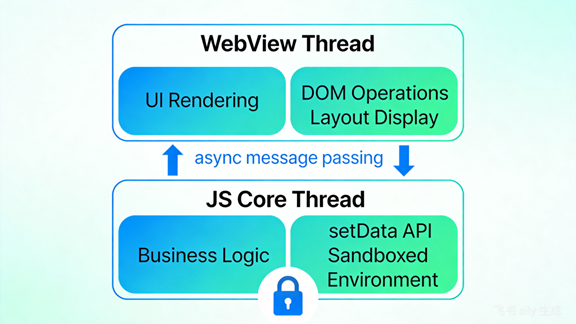
Unlike traditional web apps, mini-apps use a dual-thread architecture that separates rendering from business logic:
WebView Thread (Rendering)
· Handles UI rendering using WebView
· Manages DOM operations and layout
· Runs independently from logic
JavaScript Core Thread (Logic)
· Executes application logic in a sandboxed JS environment
· Does NOT have direct DOM access
· Communicates with the rendering thread via setData()
Why Does This Matter?
Traditional H5 apps suffer from a fundamental problem: rendering and scripting compete for the same thread. Heavy DOM manipulation blocks user interactions. Mini-app's dual-thread design decouples these concerns, resulting in buttery-smooth performance comparable to native apps.
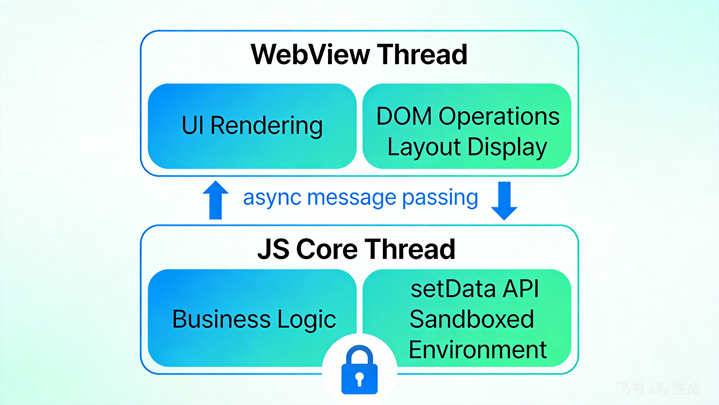
Figure 1: Mini-App Dual-Thread Architecture
4. Cross-Platform Comparison
Here's how mini-app containers compare with other cross-platform approaches:
|
Feature |
Mini-App |
React Native |
Flutter |
PWA |
H5 |
|
Performance |
Near-native |
Near-native |
Native |
Medium |
Low-Medium |
|
Dev Speed |
Very Fast |
Medium |
Medium |
Fast |
Very Fast |
|
App Store |
Yes |
Yes |
Yes |
No |
No |
|
Cross-Platform |
iOS, Android, PC, IoT |
iOS, Android |
iOS, Android, Web |
Web only |
Web only |
|
Security |
Sandboxed |
Native permissions |
Native permissions |
Browser sandbox |
Browser sandbox |
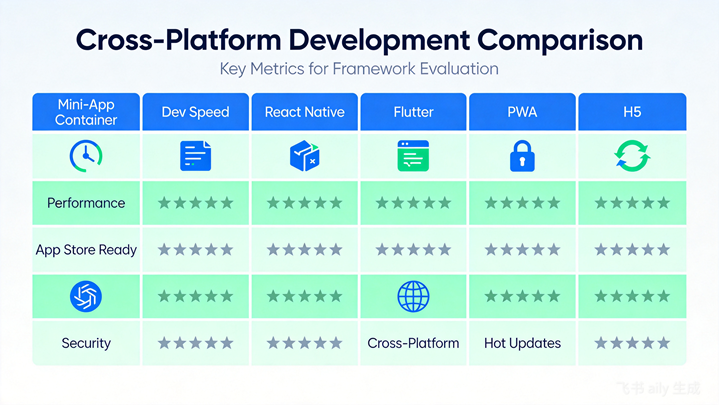
Figure 2: Cross-Platform Solutions Comparison
5. Security: The Sandbox Advantage
Security is where mini-app containers truly shine. The sandbox technology provides critical protections:
1. Boundary Enforcement
Like a child's sandbox with wooden borders, the container defines clear boundaries. Code running inside cannot access resources outside without explicit permission.
2. One-Click Cleanup
Everything in the sandbox can be wiped instantly—no lingering data, no residue. This is crucial for shared device scenarios, multi-tenant applications, and privacy-sensitive operations.
3. Fine-Grained Isolation
Mini-apps are isolated from each other AND from the host app. A malicious mini-app cannot:
· Read data from another mini-app
· Access the device file system
· Make unauthorized API calls
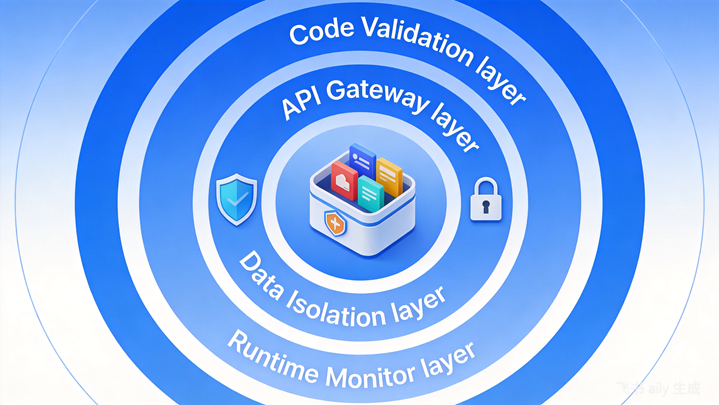
Figure 3: Multi-Layer Security Sandbox Architecture
6. Real-World Use Cases
Automotive Industry: Car manufacturers embed mini-app containers in vehicle infotainment systems. Developers create apps for navigation, music, weather, and services—without car OEMs modifying native code.
Banking & Finance: Banks run mini-apps for account management, payments, and customer service within a secure container. Compliance requirements are met without compromising user experience.
Enterprise Mobility: Organizations deploy custom mini-app ecosystems. Employees access internal tools, forms, and approvals—all managed centrally, all secure.
IoT Devices: Smart TVs, wearables, and IoT gateways gain app capabilities through lightweight containers, extending functionality without native development overhead.
7. Conclusion: When to Choose Mini-App Container
Mini-app container technology is ideal when you need:
· Fast development with a gentle learning curve
· True cross-platform including PC and IoT
· WeChat mini-app compatibility (migrate existing apps)
· Strong security with sandbox isolation
· Built-in monetization tools and ecosystem
It's less ideal for apps requiring deep hardware integration, heavy graphics processing, or completely custom UI paradigms.
The bottom line: Mini-app containers offer a unique balance of development efficiency, cross-platform reach, and security that's hard to match with traditional approaches.
Ready to explore mini-app development?
Get started with FinClip SDK
Word count: ~980 words | Tags: Mini-App, Cross-Platform, Mobile Development, Security, Sandbox